Investigator's Notebook
Building an AI-assisted financial and fraud investigation platform that supports cross-team visibility.
Client
Control Risks fraud team
Role
Product designer
Year
2026
TL;DR
Designed the case structure and AI features for a fraud investigation platform, solving a many to many problem (one task or piece of evidence tied to multiple allegations) that no simple tree model could handle. Created markdown file from our design system to prototype fast with Figma Make in order to test weekly with investigators, reversing two early decisions along the way: duplicated tasks per allegation, and allegation first navigation. Shows AI interface design under real privacy constraints, complex information architecture problem solving, and rapid AI assisted prototyping.


The Context
Designing for non-linear investigative workflows
Control Risks' investigators run fraud cases across a global team, with no shared system for tracking evidence, allegations, or ownership. Everything lived in spreadsheets, email, and personal notes.
The brief had two parts. Build a case management platform, and start designing for an AI to live inside it, without third party AI models touching sensitive case data. Every feature had to run on an in house model, which ruled out the usual approach of bolting an assistant onto an existing tool.
I was one of two designers from the first sketch, with ownership of the data model, stakeholder sessions, and feature scope that went well beyond a typical internship.
A rough prototype existed before us, built by a stakeholder to test appetite for the idea. It wasn't referenced meaningfully once real design work began.
*Rough investigation model provided to us

The Challenge
The way to structure an investigation is like a tree, right…?
The obvious structure seemed like a tree: investigation, allegations, workstreams, tasks, evidence, observations, conclusions.
That wasn't going to work for this platform. One task, an interview, an email thread, a recovered file, is often relevant to two or three allegations at once. Force a tree onto that and you either duplicate the task per allegation (copies silently go out of sync) or flatten it into one allegation and lose the allegation specific view investigators need at reporting time.
The real hurdle: let one task, one piece of evidence, one observation belong to multiple allegations, without duplicating data or losing the allegation specific view.
*Revised investigation model.

The Process
Utilising AI for rapid prototyping and testing
Structure had to be tested as user flows, not screens. Each round followed the same loop: take the current state or the next open question on rough wireframes, annotate it directly on screen, take it to investigators, then make the call. Early exploration happened in Figma, working through competing data models side by side before any visual design.
Once a direction was worth testing, we built it in Figma Make as a clickable prototype, fed our own design system as a markdown reference. That reference wasn't incidental. A large part of my role at Control Risks was overhauling that design system, and I'd deliberately built it intricate enough to hand to any AI prototyping tool and get our actual components and variables back out, rather than generic defaults. It's what let structural decisions get tested in a live, on brand prototype within the same week they were sketched, supporting one or two stakeholder calls per week.
*Annotating on stakeholder prototype to guide interview questions
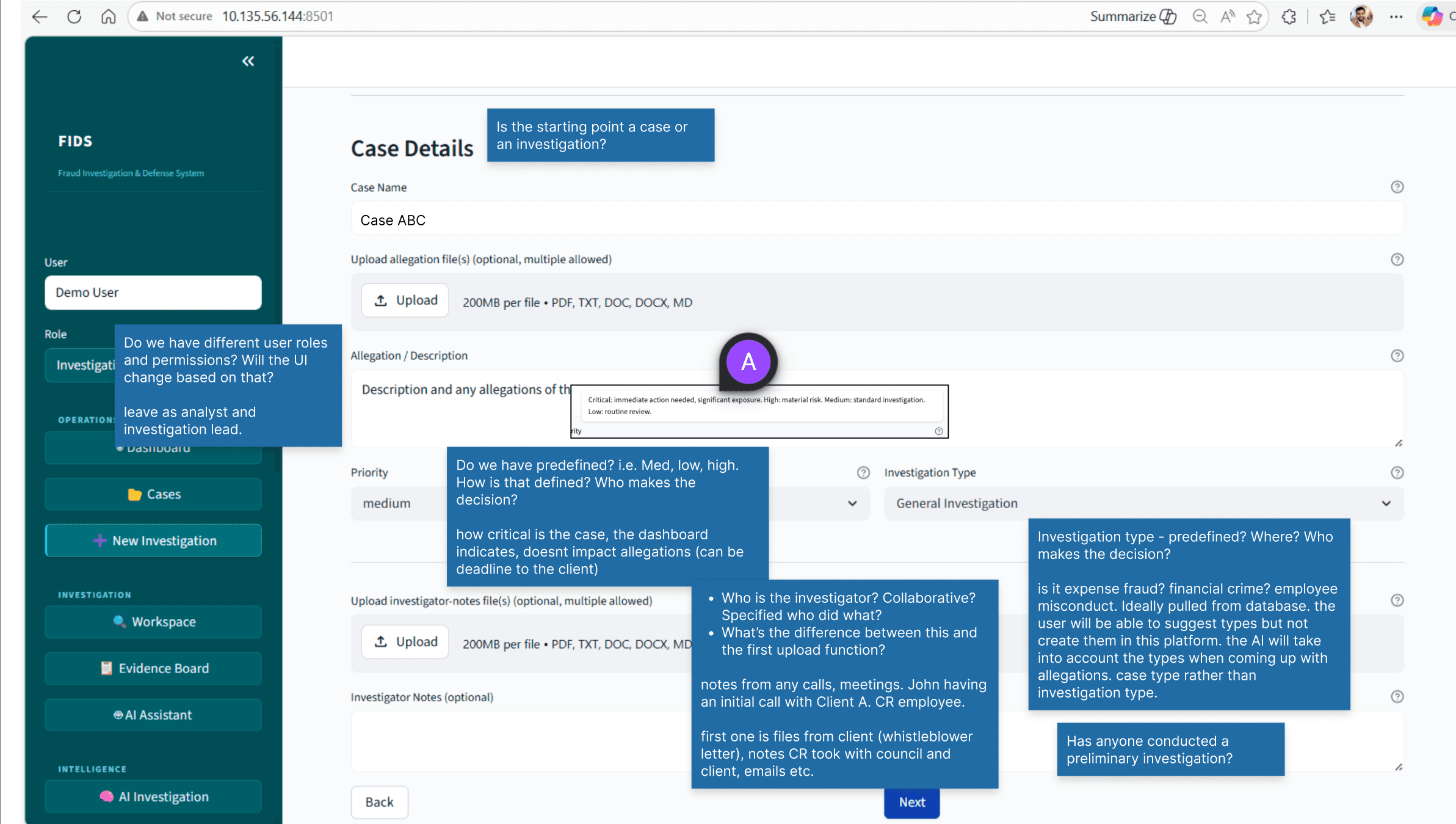
*Initial ideation

Key decision 1

Key decision 2
Finding the right viewset
Investigators were clear they wanted more than one way to look at a case, but not clear on what those views should be, so we treated view mode as something to prototype and test, not spec upfront. Alongside the primary workstream view, we tried an allegation first mode: same tasks, grouped by allegation, on the theory that investigators writing up one allegation would want everything relevant in one place.
It didn't survive testing. The same task, relevant to three allegations, appeared duplicated across three columns, the exact problem we'd just solved at the data layer, back at the navigation layer. Progress made in one view also didn't map cleanly to the other, so investigators switching views lost their place. Its logic simply didn't synergise with workstream view, which was the priority. We dropped it and instead paired workstream view with a progress based view, which covered the "different lens on the same case" need without the duplication problem.

Key decision 3
Designing for non linear investigations
Investigators told us cases rarely move in a straight line. New evidence can land mid investigation, or one investigator reviewing evidence later catches an observation a colleague missed the first time. A platform that only supported adding things in sequence would quietly go stale.
That drove three decisions: autosave, so nothing depended on someone remembering to commit a change, AI suggested updates that flag when newly added evidence or observations could affect an already drafted conclusion, and conclusion versioning surfacing the updates rather than silently leaving an outdated finding in place.

Key decision 4
Where the AI should and shouldn't act
AI surfaces were designed in: an AI Assistant panel with confidence scored suggestions, accept or dismiss, plus a chat mode. An AI assisted reporting flow that turns tagged observations into structured conclusions. Additionally, a case strength review just before the final reporting stage of the investigation.
The clearest signal from testing was a reversal. We'd had the AI draft the final report into an editable PDF. Investigators didn't want that. They preferred exporting the underlying text and writing the report themselves elsewhere. The AI's job stopped at organising and summarising evidence, not owning the final document.
That still left the question of how the model would improve. We designed two feedback channels for it. Investigators could upload a finalised report so the LLM could learn from the finished product, and every AI response or suggestion carried a thumbs up or down with an optional comment on what did or didn't work. Between the two, the model had a route to improve from both the end result and the moment to moment interaction.

The Outcome
So what was the impact?
The full case management structure, AI assistant, and reporting flow are designed and shipped as the platform's foundation, and every structural problem above, a genuinely non trivial many to many data model, view design, non linear editing, and AI scope, has a resolved, tested answer behind it rather than a guess. Control Risks is now building the in house LLM those AI features depend on, which is itself a direct consequence of the product being judged worth that investment. There's no adoption data yet because the product hasn't launched, but the design isn't a concept exercise sitting in a drawer. It's the spec engineering is building against right now.

Reflection
Designing for this level of structural complexity was new to me
And I genuinely enjoyed the challenge. Most projects I'd worked on had an obvious information architecture; this one didn't, and finding it was the actual work. It also changed how I think about AI as a design tool, not just a design subject. Feeding a properly structured design system markdown file into Figma Make turned "explain the idea to a stakeholder" into "let them click through it the same week," and that gap in speed is now something I actively design my process around, not just my products.